Project Management using Git and GitHub 🌍
Project Management using Git and GitHub
Version Control Systems for Modern Development
A Complete Guide to Git, GitHub, and Project Management
What is Version Control?
Version Control Systems (VCS) track changes to files and coordinate work among multiple people.
Key Benefits:
- Track Changes: See what changed, when, and who made the change
- Backup & Recovery: Never lose your work with complete history
- Collaboration: Multiple developers can work on the same project
- Branching: Work on features independently without affecting main code
- Rollback: Easily revert to previous working versions
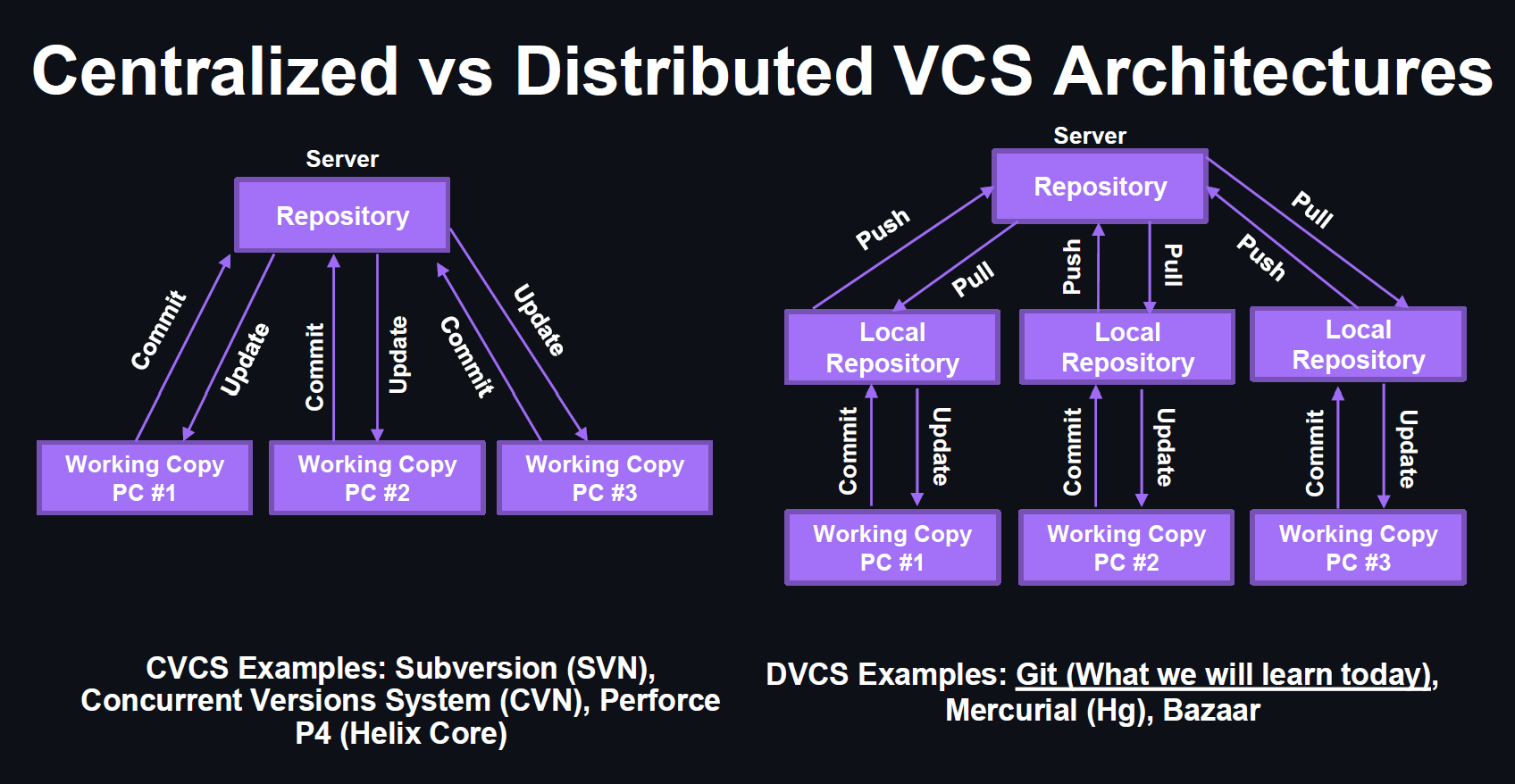
Centralized vs Distributed Version Control
What is Git?
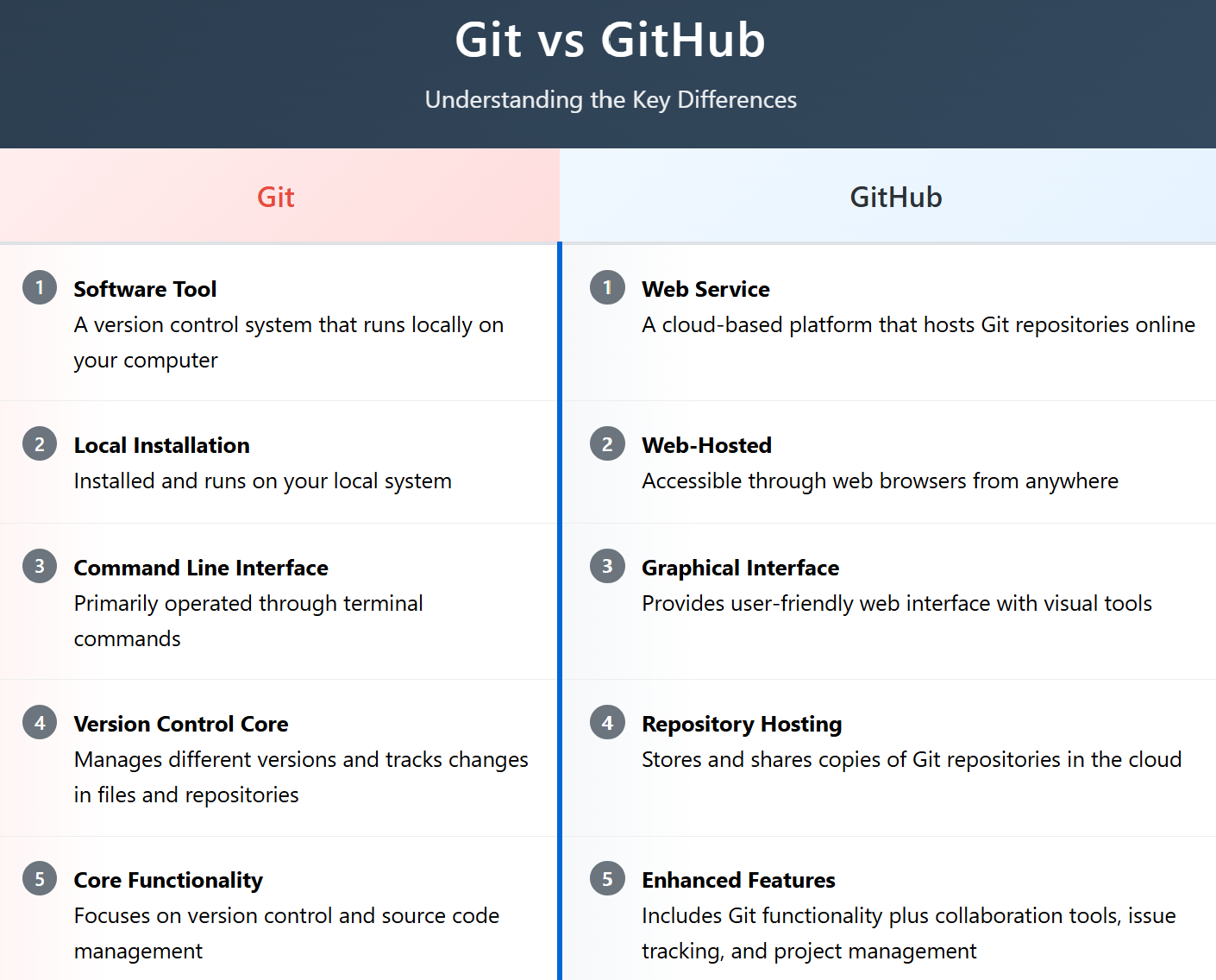
Git is a free, open-source distributed version control system designed to handle everything from small to very large projects with speed and efficiency.
Fast & Efficient
Optimized for performance with intelligent compression
Distributed
Every working directory is a full-fledged repository
Data Integrity
Everything is checksummed using SHA-1 and SHA-256 hash
Branching
Cheap local branching and easy merging
What is GitHub?
GitHub is a cloud-based hosting service for Git repositories, providing a web-based interface and additional collaboration features.
Key Features:
- Repository Hosting: Store and manage Git repositories in the cloud
- Collaboration Tools: Issues, pull requests, code reviews
- Project Management: Projects, milestones, and task tracking
- CI/CD: GitHub Actions for automated workflows
- Documentation: Wiki, README files, and GitHub Pages
- Social Coding: Follow developers, star repositories, contribute to open source
Git Setup and Installation
1. Install Git
# macOS: brew install git
# Ubuntu/Debian: sudo apt install git
# CentOS/RHEL: sudo yum install git
2. Configure Git
git config --global user.email "your.email@example.com"
git config --global init.defaultBranch main
3. Verify Installation
git config --list
GitHub Setup
1. Create GitHub Account
Visit github.com and sign up for a free account
2. Set up SSH Key (Recommended)
ssh-keygen -t ed25519 -C "your.email@example.com"
# Add SSH key to ssh-agent
eval "$(ssh-agent -s)"
ssh-add ~/.ssh/id_ed25519
# Copy public key to GitHub
cat ~/.ssh/id_ed25519.pub
3. Alternative: Personal Access Token
Go to GitHub Settings → Developer settings → Personal access tokens → Generate new token
Essential Git Commands - Basics
Essential Git Commands - Branching
Essential Git Commands - Remote
Git Three-Stage Architecture
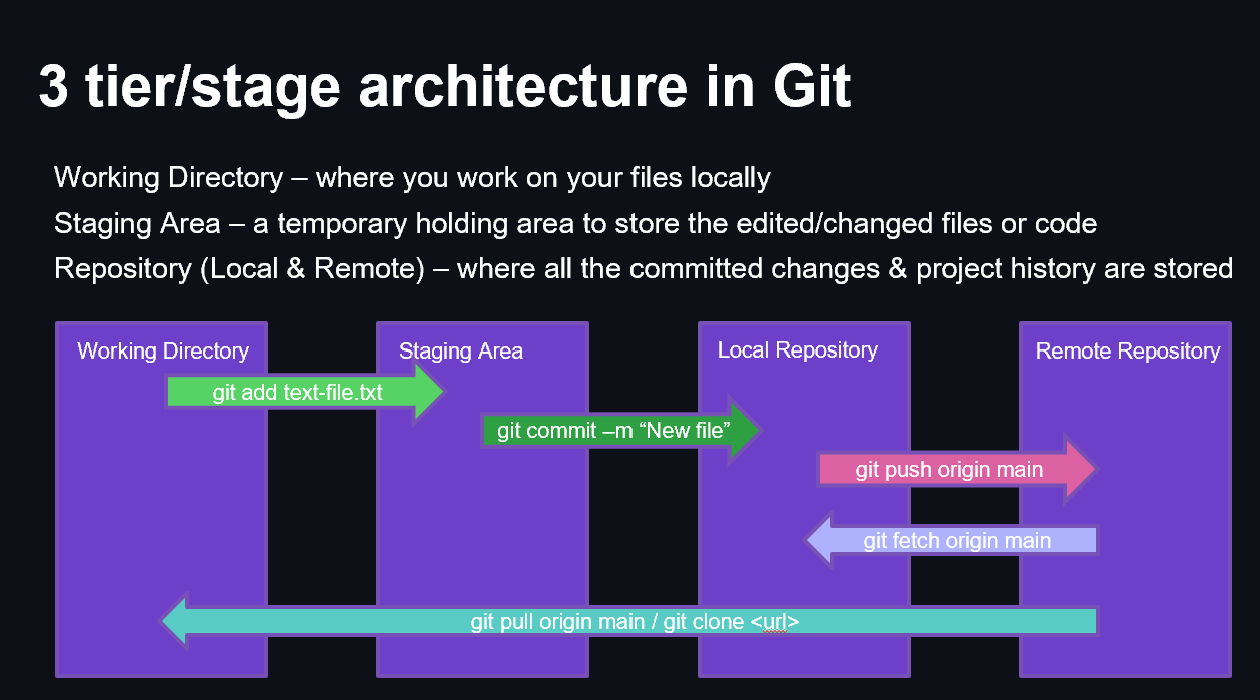
echo "Hello World" > hello.txt
git add hello.txt
git commit -m "Add hello file"
git push origin main
GitHub Project Management Features
Issues
Track bugs, feature requests, and tasks with labels, assignees, and milestones
Pull Requests
Code review process, discuss changes, and collaborate before merging
Projects
Kanban-style boards to organize and prioritize work across repositories
Milestones
Group issues and pull requests into release cycles or project phases
Additional Features:
- Wiki: Documentation and knowledge base
- Actions: CI/CD workflows and automation
- Releases: Package and distribute software versions
Git vs GitHub
Git & GitHub Best Practices
Commit Best Practices:
- Clear Messages: Use present tense, imperative mood
- Atomic Commits: One logical change per commit
- Regular Commits: Commit early and often
Project Management Best Practices:
- Use Issues: Track all work items and discussions
- Link Issues: Reference issues in commits and PRs
- Code Reviews: Always use pull requests for main branch
- Documentation: Keep README and docs updated
- Branching: Use descriptive branch names
- Tags: Mark important releases and versions
Summary
What We've Covered:
- Version Control Systems: CVS vs DVS concepts
- Git Fundamentals: Installation, configuration, and core concepts
- GitHub Platform: Cloud-based collaboration and project management
- Essential Commands: Complete toolkit for daily Git operations
- Project Management: Issues, pull requests, and workflow strategies
- Best Practices: Professional development workflows
Next Steps:
- Practice with a sample project
- Explore GitHub's advanced features
- Implement a branching strategy
- Set up automated workflows with GitHub Actions